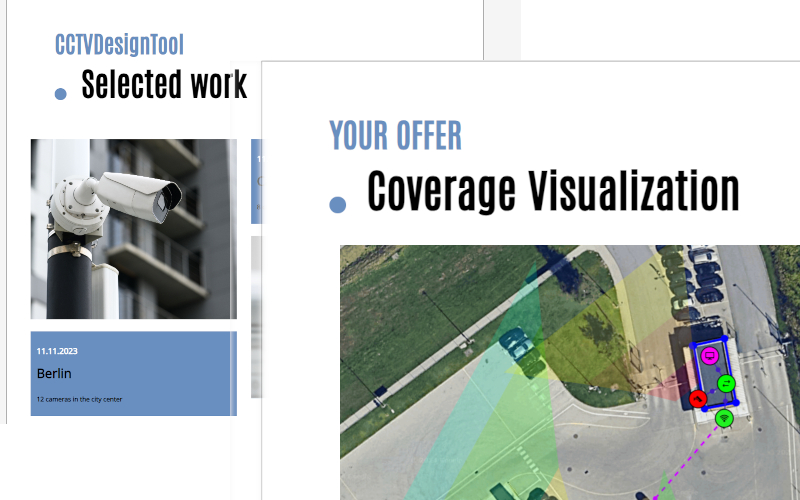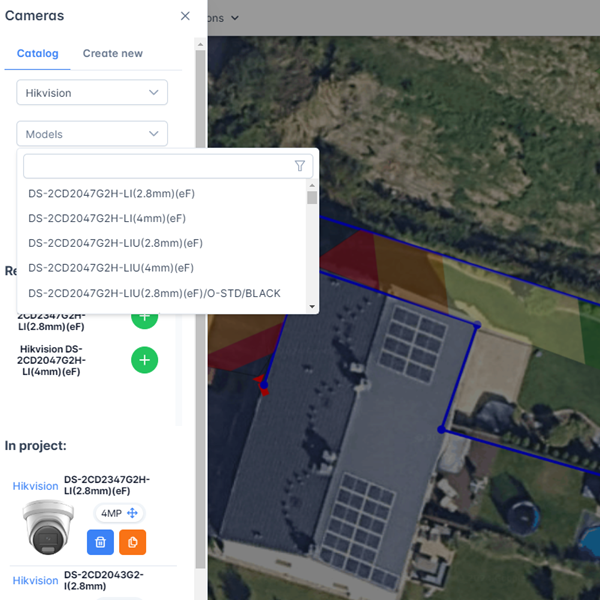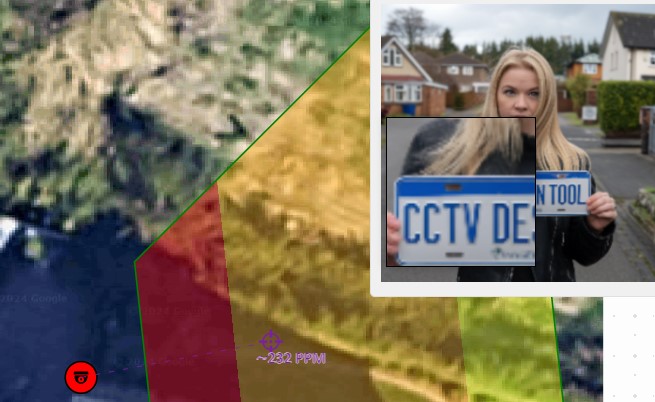

IPVM Calculator and CCTV Design Tool are both browser-based, both support floor plan import, and both calculate FOV and DORI zones. That's roughly where the overlap ends. The two tools are built for different parts of the design workflow — and understanding that difference will tell you immediately which one belongs in your daily process.
What Each Tool Is
IPVM Calculator (calculator.ipvm.com) is a camera layout and FOV visualisation tool built by IPVM, the independent physical security research and news organisation. Its camera database is backed by IPVM's own lab testing data — a meaningful advantage in accuracy. Its core strength is the Google Maps-native workflow: you type an address, the satellite view loads instantly, and you start dropping cameras directly onto the real site. It is excellent for quick assessments and pre-sale feasibility work. It does not generate quotes, client proposals, or BOMs with pricing.
CCTV Design Tool (cctvdesigntool.com) is a full project design platform — from floor plan to signed proposal. It covers FOV and DORI simulation, cable routing, multi-floor layouts, auto-generated network topology, and a complete proposal module with BOM, pricing, profit margins, and branded PDF exports. It is designed to replace the combination of a FOV calculator, a spreadsheet, and Word — all in one browser session.
Pricing
IPVM Calculator is accessible free with a hard limit of 4 cameras per project and a 1-minute session timer — enough to preview the tool, not enough for real project work. Full access (unlimited cameras, saved projects) requires an IPVM subscription at $199/year, billed annually only. There is no monthly billing option.
CCTV Design Tool has a permanently free tier — no time limit, no session timer — with up to 3 cameras and 3 devices per project and full access to the 31,800+ camera database. The Premium plan is $6/month billed annually ($72/year) with no camera limit. Enterprise team plans start from $50/seat/year.
| IPVM Calculator | CCTV Design Tool | |
|---|---|---|
| Free tier | 4 cameras, 1-min session | 3 cameras, no time limit |
| Full access price | $199/year | $72/year ($6/mo annual) |
| Monthly billing | No | Yes ($12/mo) |
| Camera limit (paid) | Unlimited | Unlimited |
At $72 vs $199 per year, CCTV Design Tool Premium is less than half the cost of IPVM Calculator full access.
Camera Database
IPVM Calculator has 12,000+ camera models from 100+ manufacturers. A notable strength: many specs in the IPVM database come from independent lab testing, not just manufacturer datasheets — which means FOV and IR range figures are more likely to reflect real-world performance.
CCTV Design Tool has 31,800+ camera models from 150+ manufacturers, updated daily. It also includes 29,000+ security devices (NVRs, PoE switches, access controllers, intercoms) and 6,000+ accessories. Missing models can be requested and are typically added quickly.
If you're working with a camera brand that isn't mainstream, CCTV Design Tool's larger and more frequently updated database is more likely to have it. If you're selecting from the cameras IPVM has independently tested, their database carries extra weight on accuracy.
Core Design Features
FOV, DORI, and PPM
Both tools display DORI zones (Detection, Observation, Recognition, Identification per IEC/EN 62676-4) as colour-coded overlays on the floor plan. Both calculate pixels per metre (PPM) in real time. Both include IR night vision range simulation.
IPVM Calculator has a distinctive Google Street View integration: position a camera on a real-world location and get a simulated image preview showing what that camera would actually capture — pixel density overlaid on the Street View photo. This is useful when presenting to clients who want to visualise coverage at a specific entrance or car park. CCTV Design Tool does not have this feature.
Floor Plan Import
IPVM Calculator imports raster floor plans (JPG, PNG, BMP, PDF). It has no DWG or DXF CAD import.
CCTV Design Tool imports JPG, PNG, PDF, and DXF files with layer selection — selected DXF layers become walls in the design. It also lets you pull satellite imagery from any address directly into the floor plan canvas, similar to IPVM's Google Maps workflow.
Walls and Blind Spots
Both tools support drawing walls on the floor plan. IPVM Calculator clips FOV cones at walls and shows the blind spot in front of the camera based on mounting height. CCTV Design Tool does the same, and extends it to a full multi-discipline canvas — CCTV, alarms, access control, and network devices on the same floor plan with toggleable layers.
Multi-Floor Projects
CCTV Design Tool handles multi-floor projects natively — each floor has its own canvas, all within a single project file. Reports and proposals include all floors.
IPVM Calculator has no native multi-floor support. The workaround is to create one project per floor; there is no way to combine them.
Cable Planning
Both tools include a cable routing module where you draw runs from devices to network closets and get automatic length calculations.
CCTV Design Tool adds per-cable-type totals (Cat6, coax, fibre, alarm cable), unit pricing per cable type included in the BOM, and CSV export of the full connection list for purchase orders.
BOM and Proposals
This is the most significant practical difference between the two tools.
IPVM Calculator generates technical exports — PDF layout reports, per-camera breakdowns, PowerPoint slide decks, and CSV device lists. These are useful as technical exhibits in a proposal. There is no pricing data, no profit margin calculation, no cover page, no terms section, and no company branding. If you want a client-ready proposal document, you take the IPVM export and rebuild it in Word or a separate quoting tool.
CCTV Design Tool generates finished proposals. The Document Creator produces a fully branded PDF — company logo, colours, floor plan with coverage, BOM with quantities and unit costs, profit margin summary, and multiple page templates. A separate Simple Report module handles quick one-pagers for smaller jobs. You set cost and margin per device; totals update live. Exports are watermark-free on Premium.
Additionally, CCTV Design Tool generates an interactive client share link: instead of a PDF, you send your client a live link where they can explore the design in their browser, see coverage, and review the camera list — with your branding, no login required, and an optional expiry date.
For installers who send proposals regularly, the time saved on this step alone is the main reason to choose a full design tool over a calculator.
Team Collaboration
IPVM Calculator has no team features. Projects can be shared via a read-only permalink, but there is no role-based access, no simultaneous editing, and no shared device library.
CCTV Design Tool includes a full Enterprise tier with multi-user team accounts, user groups with per-group view/edit/export permissions, enforced company branding across team exports, a shared device library, and admin-controlled settings.
Development Status
One important practical point: as of early 2026, IPVM has confirmed that the Calculator is in maintenance mode — bug fixes only, no new features planned. A long backlog of requested improvements (DWG import, multi-floor support, full BOM pricing, team collaboration) is unlikely to be addressed.
CCTV Design Tool is in active development with a regularly updated changelog.
Who Should Use Which
IPVM Calculator is a good fit if:
- Your work is primarily site survey and camera selection — quick feasibility checks before committing to a full design
- The Street View image quality preview is a tool you use regularly in client conversations
- You already have an IPVM subscription for their research content and the calculator is a bonus
- You are comfortable building proposals separately in Word or a quoting tool
CCTV Design Tool is a better fit if:
- You need a complete workflow from floor plan to finished proposal in one tool
- You send quoted proposals to clients with your own branding
- Your projects span multiple floors
- You work with DXF/CAD floor plans
- You design systems with NVRs, switches, and access control devices alongside cameras
- You need a team workspace with shared projects and role-based permissions
- You want a monthly billing option rather than an annual commitment
Summary
| IPVM Calculator | CCTV Design Tool | |
|---|---|---|
| Platform | Browser + mobile | Browser + mobile |
| Free tier | 4 cameras, 1-min session | 3 cameras, no time limit |
| Paid price | $199/year (annual only) | $6/month annual / $12/month monthly |
| Camera database | 12,000+ (IPVM-tested specs) | 31,800+ (daily updates) |
| DORI zones | Yes | Yes |
| Google Maps / satellite | Yes — core feature | Yes |
| Street View preview | Yes | No |
| DXF/CAD import | No | Yes |
| Multi-floor | Workaround only | Native |
| BOM with pricing | No | Yes |
| Branded PDF proposals | No | Yes |
| Client share link | Read-only permalink | Interactive, branded, expirable |
| Team collaboration | No | Yes (Enterprise) |
| Active development | Maintenance mode | Active |
Both tools are genuinely useful. IPVM Calculator is the right choice for quick camera layout checks and pre-sale assessments, especially if IPVM's tested database data is important to your workflow. CCTV Design Tool is the right choice when your output is a full project — floor plan, cable schedule, BOM, and client proposal — delivered under your company brand.
You can start using CCTV Design Tool for free at cctvdesigntool.com — no credit card, no time limit.